
Your account
Upgrade
Move an organisation to a paid plan from inside Obsidian, pay on the payment provider's page in your browser, and manage or cancel it later.
You buy a plan from inside Obsidian. There is no web sign-up, because your encryption keys are made on your device and an account cannot be set up for you from a web page.
Before you start
- You are the owner of the organisation. Only an owner can change its plan.
- Look at the pricing page to decide which plan, and monthly or yearly.
Steps
Open Settings, choose Nectenda, and open the organisation under Organisations.
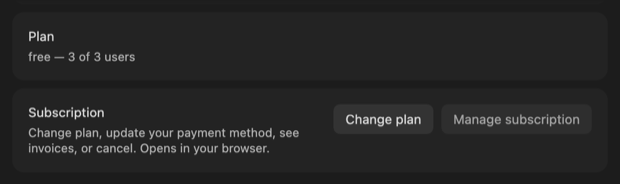
In the Plan, storage and devices section, beside Subscription, choose Change plan.
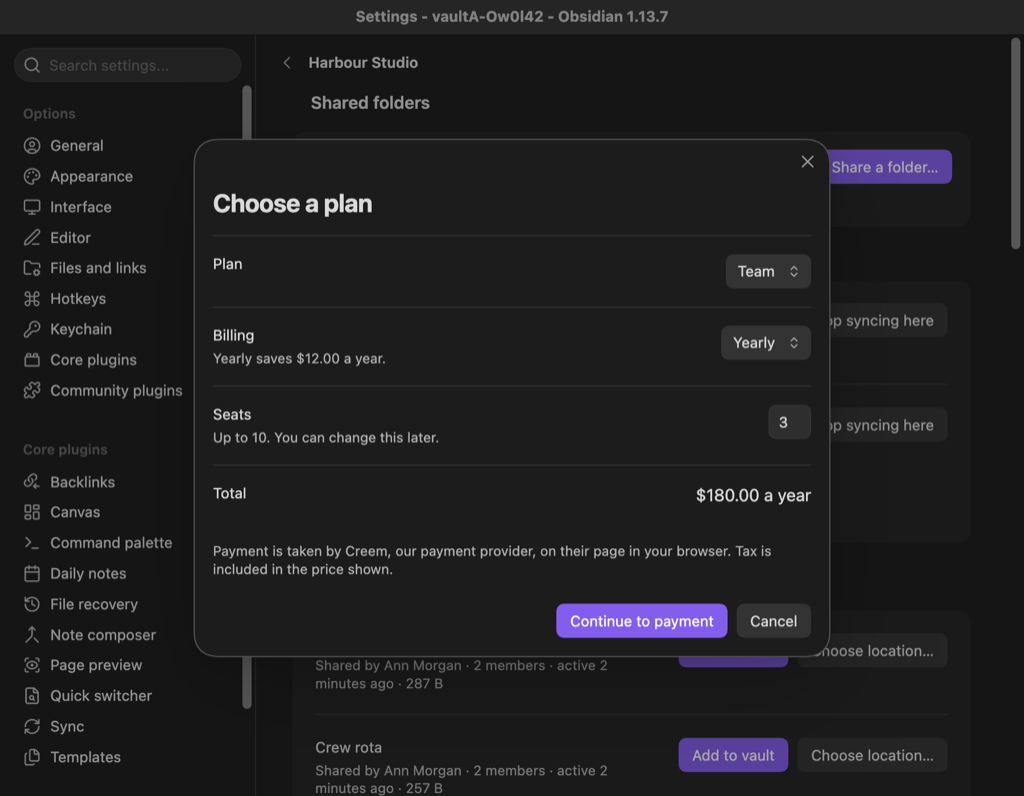
In Choose a plan, pick the Plan and the Billing term. For a plan priced per seat, set Seats.
Check the Total, then choose Continue to payment.
Your browser opens the payment page of Creem, the payment provider. Pay there, then come back to Obsidian.
Check the result
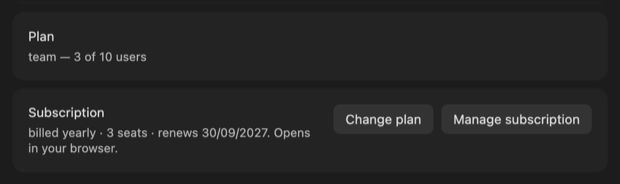
The Plan line on the organisation's page shows the new plan, and Subscription shows the term and when it renews.
Nectenda applies the change as soon as the payment provider confirms your payment. If that first attempt does not get through, it tries again every hour, so allow up to an hour before contacting us.
Troubleshooting
Change plan is greyed out
You are not the organisation's owner. Ask the owner to upgrade it.
It says the organisation was only just created
A new organisation takes a few seconds to be registered for billing. Try again shortly.
How do I cancel, or change my card?
Choose Manage subscription beside Subscription. It opens the provider's page, where you can change the payment method, see invoices or cancel. A cancellation set for the end of the period you have paid for moves the organisation to Free when that period ends. Nothing is deleted.
Is tax added at checkout?
No. The price shown includes it.